October 1, 2026
If you’re trying to improve search visibility, Google Search Console gives you the significant starting point most optimization work needs: the queries already surfacing your pages, along with impressions, clicks, CTR, average position, indexing status, and now direct reporting on impressions from AI Overviews and AI Mode.
Get a Ground Truth Dataset: Start With Your GSC Data (it’s free)
There are plenty of ways to check AI search visibility. You can run relevant questions through ChatGPT, Gemini, or Perplexity, see whether your brand appears, note which pages get cited, and repeat the exercise over time. I put together a simple AI search visibility framework and worksheet for doing exactly that.
Today, Google Search Console adds an essential view of data from Google itself. Its Performance report shows impressions, clicks, CTR, average position, and the queries and pages producing that activity. You can compare those results across dates, devices, countries, and other dimensions.
Before you make a change to an important webpage, it just makes sense to record its current performance. If you don’t measure first, you can’t accurately gauge the benefits or drawbacks of the change you’re implementing.
That sounds obvious, but it changes the quality of the decision you’re about to make.
The Same Numbers Can Mean Different Things for Different Pages
Imagine two pages: One has 20,000 impressions and a 0.8% CTR. Another has 300 impressions and a 5% CTR. Those numbers don’t tell you that either page is healthy or unhealthy on their own. Position, query intent, and the searches producing those impressions all matter.
But they immediately give you better questions. The first page already has substantial exposure. Why are relatively few searchers clicking? The second gets far fewer opportunities to earn a click. Does it need stronger relevance for the queries that matter, better internal linking, more authority, or something else entirely?
Search Console helps you see that difference before an optimization tool tells you to rewrite both pages.
That becomes particularly useful when you’re managing a large site. I use the same idea in How to Audit Content in the Age of AI Search. Existing search performance is useful evidence when deciding whether a page deserves a rewrite, an expansion, consolidation, or simply more time.
Google Now Shares First Party AI Search Visibility Data
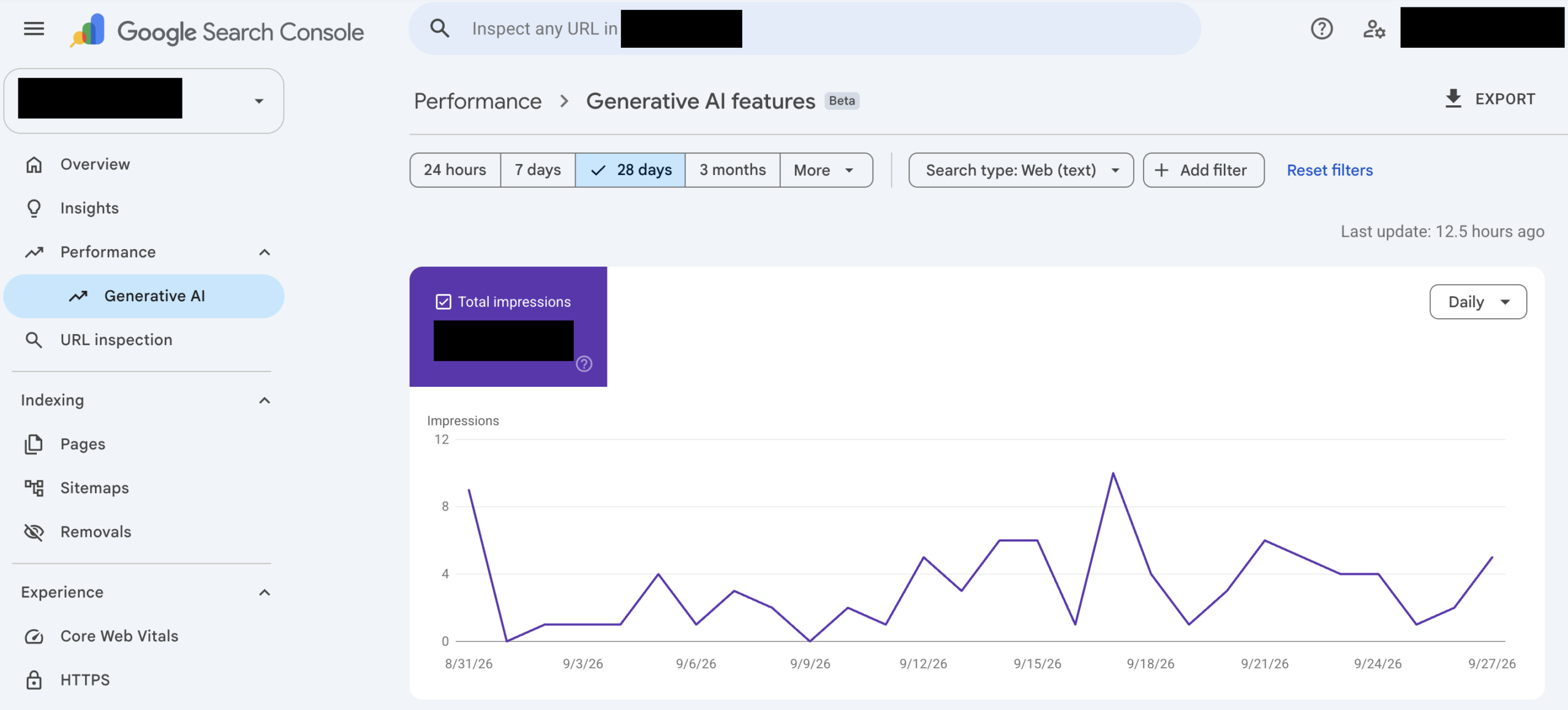
In 2026, GSC became much more useful for AI search specifically. Google’s Generative AI performance report shows impressions from AI Overviews and AI Mode. You can see how those impressions change over time, which pages receive them, and where they come from by device and country. Google says the report is now available worldwide.
That gives marketers and SEO teams a direct answer to a question that used to be much harder to investigate:
Which of my pages is Google actually surfacing inside its generative search experiences?
You can then compare pages, watch trends, and see whether the pages you’re actively working on are gaining or losing AI-search exposure.
Search Console Is Expanding With Search Itself
Google has also begun reporting multimodal search activity, including searches involving Lens, Circle to Search, image uploads, and Chrome’s image-search feature. Those signals are appearing in both the standard Performance report and the Generative AI report.
That matters because search behavior is spreading well beyond the traditional typed query. Search Console is becoming a place where you can see more of those discovery paths together instead of treating every new search interface as an entirely separate world.
The AI Report Gives You Something Concrete to Track
The current Generative AI report is centered on impressions. It tells you that links from your site were shown in Google’s generative Search features and lets you track that visibility over time. That creates some very practical uses.
If you optimize ten important pages, you can watch which ones begin earning more AI impressions. If one section of your site consistently receives more exposure than another, you’ve got something worth studying. If AI visibility changes after a major content update, you’ve got a date and a measurable trend to compare.
You can also compare that information with the rest of your Search Console data instead of evaluating AI visibility in isolation.
More detailed generative-search engagement reporting is also due for UK publishers under the CMA’s Google Search requirements later this year. Learn more about this in my article from earlier this year: Google Legally Required to Add AI Visibility Features: Here’s What’s Coming and When.
GSC Can Tell You What to Investigate Before You Rewrite
Some of the most useful information in Search Console has nothing new or exotic about it: Is the page indexed? Which canonical URL did Google select? Can Google crawl it correctly? Which queries already show the page? Those checks can save a lot of wasted optimization work.
Google’s current guidance says pages need to be indexed and eligible to appear in normal Search with a snippet to qualify as supporting links in AI Overviews and AI Mode. Existing SEO fundamentals still apply. Google also says there isn’t any special AI schema, markup, AI text file, or required content format that unlocks these features.
So if an important page isn’t indexed, there’s a clear place to start. If Google has chosen a different canonical URL, that deserves attention. If the page already performs strongly for a group of valuable queries, you know what existing visibility you want to protect while improving it.
You Can Also Control Whether Google Uses Your Site in Generative Search
Search Console now includes a Search generative AI control under Settings.
Site owners can choose whether their links and content are eligible to appear in AI Overviews, AI Mode, and supported generative features in Discover. Inclusion is the default. Search Console also shows whether a property’s setting is inherited from a parent property.
That gives website owners something they’ve rarely had in the early stages of AI search: a direct control alongside direct reporting.
If AI search visibility is part of your strategy, checking that setting belongs alongside checking indexing and performance.
Measure What Happens After You Make the Change
The real benefit of establishing the starting point comes afterward.
Record what you changed and when. Once Google has recrawled the page, return to the same metrics. Look at impressions, clicks, queries, CTR, position, and AI impressions where available. You now have a before-and-after record.
Maybe a page begins appearing for more relevant searches. Maybe impressions rise while clicks stay flat. Maybe an important query loses visibility. Maybe Google’s AI impressions begin climbing while traditional Search remains steady.
Each result gives you a better next question, and better insight into what changes to your site actually move the needle for driving the search performance metrics you’re aiming for.
This is the measurement problem I explored in How Do You Know If Your AI Search Strategy Is Actually Working? Visibility, user behavior, and business impact are different layers of performance. Tracking them separately makes it much easier to understand what’s actually changing.
Connect Search Visibility to What Happens on the Site
Search Console gives you the pre-click side of the journey. Google Analytics gives you what happens after someone arrives.
Google recommends using the two together for exactly that reason. Search Console shows how people discover your site through Google Search. Analytics can show what those visitors do afterward, including engagement and conversions.
So if a page gains more visibility and more clicks, you can continue the investigation in Analytics. Did those visitors engage? Did they reach an important page? Did they complete a form, subscribe, or make a purchase?
I covered a broader version of that workflow in How to Get Better AI Search Data From Four Free Tools You Already Use, using GSC, GA4, Bing Webmaster Tools, and Microsoft Clarity together.
Different tools give you different pieces of the journey. That’s useful when you know what question you want each one to answer.
A Simple GSC Routine for Search Optimization
For any page important enough to optimize, I’d capture five things:
-
-
- Indexing and canonical: Is the page indexed, and is Google using the URL you expect
- Existing visibility: Which queries show the page, and what are its impressions, clicks, CTR, and average position?
- AI visibility: Is the page receiving impressions in Google’s Generative AI report?
- The change: What did you change, and when did it go live?
- The result: What happened to those same signals after Google re-crawled the page?
That creates a simple record of the page before and after the work.
Do this consistently and you start building something more valuable than a list of SEO or AI-search recommendations… You start building your own evidence about what tends to improve performance on your site.
Google Data Fits Into a Bigger AI Search Picture
Search Console covers Google. Other tools can show you what’s happening elsewhere. That’s where AI visibility monitoring becomes useful. You may want to know whether ChatGPT mentions your company, whether Perplexity cites a competitor, what sources Claude uses, or how your visibility changes across different answer engines. Those observations can sit alongside the first-party data coming from Google instead of replacing it.
I explored that distinction in What Google’s AI Search Guide Won’t Tell You. Google’s guidance tells us a great deal about succeeding in Google’s systems. Other AI search environments give us additional questions to investigate.
Why RankAbove Uses GSC as a Baseline
This is why Google Search Console plays an important role inside RankAbove. We use its first-party Google Search data as a baseline for the pages we analyze. That means recommendations provided by the platform can be considered alongside the visibility a page already has, the queries already showing it, its technical status, AI-search signals, and the changes that have previously been made.
A page with valuable existing visibility should be treated with that history in mind. A page with an indexing problem deserves a different recommendation. Once a user approves and implements a change, its subsequent performance becomes another piece of evidence for what RankAbove recommends next. The result is an always-improving playbook for SEO and AI search visibility.
The result is a much more useful loop:
See what the page is doing → decide what to change → make the change → measure what happens → use that evidence the next time.
The person using RankAbove still decides which recommendations make sense, which to change, add, or remove, and which changes go live. Humans set the strategy. AI tracks it all for you. Read more about ethical AI tools that put humans first in The AI You Choose Is a Vote for the Future of Marketing.
The opportunity I see in AI search isn’t simply getting machines to make more decisions for us. It’s giving the people responsible for search better information, faster feedback, and a clearer view of what happens when they act.
Google Search Console gives us one very useful part of that evidence. If you don’t use GSC today, you can create a free account and connect it to your website in minutes.
How to Become a Preferred Source in Google’s AI Overviews
Since you made it this far, here’s a “treat” to kick off your October festivities: Google now lets users choose which websites they want to see more often in its AI generated search results. To allow users to choose your site as a preferred source, it’s as simple as adding a small button on your page. If someone selects your site as a preferred source, your content can be highlighted with a “preferred” badge in AI Overviews, AI Mode, and Top Stories results.
Help your readers find your site through preferred sources in Google Search here.
About the Author
Don Pingaro is Regional Marketing Director, North America at Fulcrum Digital and author of The AI Search Brief, where he discusses AI search strategies, customer experience, marketing technology, and the changing role of the people responsible for all three. He also manages R&D and go-to-market strategy for RankAbove.ai.
Subscribe to the AI Search Brief here.
Related Articles from The AI Search Brief
Additional Sources