RankAbove logo — purple pulse-line mark with animated teal dot, next to white 'rankabove' wordmark

The four core metrics

Clicks counts visits from search results. Impressions counts how often you appeared. CTR is the ratio between them, and average position is where you ranked when you appeared. Together they tell you whether a change moved discovery, appeal, or both.

Reading movement after a change

Impressions respond first: better rankings and new citations put you in front of more searches. Clicks and CTR follow as searchers (and AI engines) choose you more often. Position improvements typically show within two to four weeks of a deployed change.

Best practice

Judge each optimization cycle on a full 30-day window. Comparing a few days before and after a change mostly measures noise.

Pairing Performance with the Observatory

Performance shows traditional search results; the Observatory shows AI citations. A page can gain citations without gaining rank, so check both before deciding whether a change worked. The combination is the full picture of findability.

Using it for reporting

The Performance page is built for the monthly cycle: run your analysis, deploy approved changes, wait 30 days, and screenshot the deltas for your report. Every metric is drawn directly from Google Search Console, so numbers match what your SEO team already reports.

The eight pillars

Each pillar is scored 0 to 100, based on real citation behavior across the monitored AI platforms and updated daily:

Factual Accuracy

Claims are verifiable and consistent with authoritative sources.

Source Authority

Your domain is recognized as a credible origin for the topic.

Structured Data

Schema markup lets engines parse entities, products, and facts.

Citation Density

Quotable, self-contained statements engines can lift as answers.

Content Depth

Coverage that answers the question and its follow-ups.

E-E-A-T Signals

Experience, expertise, authoritativeness, and trust markers.

Freshness

Recency signals engines weigh when choosing between sources.

Brand Clarity

How unambiguously engines understand who you are and what you offer.

Why the pillars are empirical

Pillar weights are not fixed. As DataLab accumulates citation data, the scoring recalibrates automatically to match how LLMs are actually selecting sources right now. A pillar that starts mattering more to the engines starts mattering more to your score.

Reading your snapshot

Your performance snapshot shows all eight pillar scores for a page or site. Healthy pillars sit above 80; anything under 60 is actively limiting your citation share.

Tip

Low Structured Data and Citation Density scores are the most common pattern, and usually the fastest to fix: the Analyze workflow can generate the missing schema and rewrite key passages into quotable form.

Improving a weak pillar

Run the page through "Analyze". Each recommendation is tagged with the pillar it improves and a projected point range, so you can target the weakest pillar directly and confirm the movement on your next analysis.

Grounded in your actual page

Every recommendation RankAbove generates starts from the current content and context of the page being analyzed: the page is crawled at analysis time, and your connected Google Search Console and Google Analytics data supply the surrounding context. Recommendations are built from what your page actually says today, not from generic templates.

Human review is mandatory

Nothing RankAbove recommends is published automatically. Every recommendation passes through a mandatory human review step: your team reads it, edits it, and approves it, or it does not ship. On Team plans, the Admin can additionally require their own sign-off before anything publishes to a connected CMS. See Approvals, governance and rollback.

Keeping your voice

The edit step is also your brand-accuracy control. Any user can edit a recommendation directly before it ships, and page-level Custom Instructions apply your voice, audience, and messaging rules across every recommendation on a page at once. See Using the Page Rule Content Agent.

What RankAbove does not do

RankAbove does not automatically monitor AI platforms for misstatements about your brand, and it will not alert you if an engine describes your product incorrectly. If you find an AI answer getting your brand wrong, the practical response is to strengthen the page that should be the source: analyze it, refresh its content, and track the relevant prompt in the Observatory to watch whether the answer improves. See Tracking AI citations in the Observatory.

What DataLab does

Every day, DataLab runs structured queries against the major AI engines: ChatGPT, Claude, Gemini, Perplexity, and Grok. Google SERP features, including AI Overviews, are tracked weekly, in a deliberately separate pipeline, so SERP results are never mixed into your AI citation rates. For each query, DataLab records which sources the engine cites, where your brand appears, and where you have no presence at all.

The result is a living map of your citation share: the portion of relevant AI answers that actually reference your site.

Finding citation gaps

DataLab highlights the queries your brand is missing citations on entirely. These are the highest-value opportunities: an AI engine is already answering the question, it just is not using you as the source.

Tip

Pair a citation gap with the page that should be winning it, then run that page through the Analyze workflow. The recommendations will target that specific gap.

Empirical scoring, not guesswork

Most AI search tools score your readiness against theoretical models. DataLab scores your actual citation performance and recalibrates continuously as real LLM citation data accumulates. As engines change how they select sources, your scores and recommendations shift with them.

What improves over time

Because DataLab learns from every data point, RankAbove's guidance gets more precise the longer you use it. Recommendations draw on what is genuinely earning citations in your category this month, not last year's best practices.

What lives in the Observatory

Open "Observatory" in the main menu. Along the top sits a row of tabs: Coverage, Citations, Page Intelligence, AI Referrals, Insights, Search Presence, Prompts, and Trends. The Citations tab, and where its data actually comes from, is covered in Tracking AI citations in the Observatory and How RankAbove sources citation data. This article covers everything else.

How often the data refreshes

RankAbove Observatory actively queries the major AI engines, ChatGPT, Claude, Brave, Perplexity, and Gemini, with Grok coming soon, plus Google, to track how often your content is cited. Citation tracking runs daily at 4 AM UTC. SERP features are tracked weekly, on Sundays. The methodology is grounded in published academic research (ACM KDD 2024), the same rigor described in How RankAbove sources citation data.

Coverage: per-engine strength

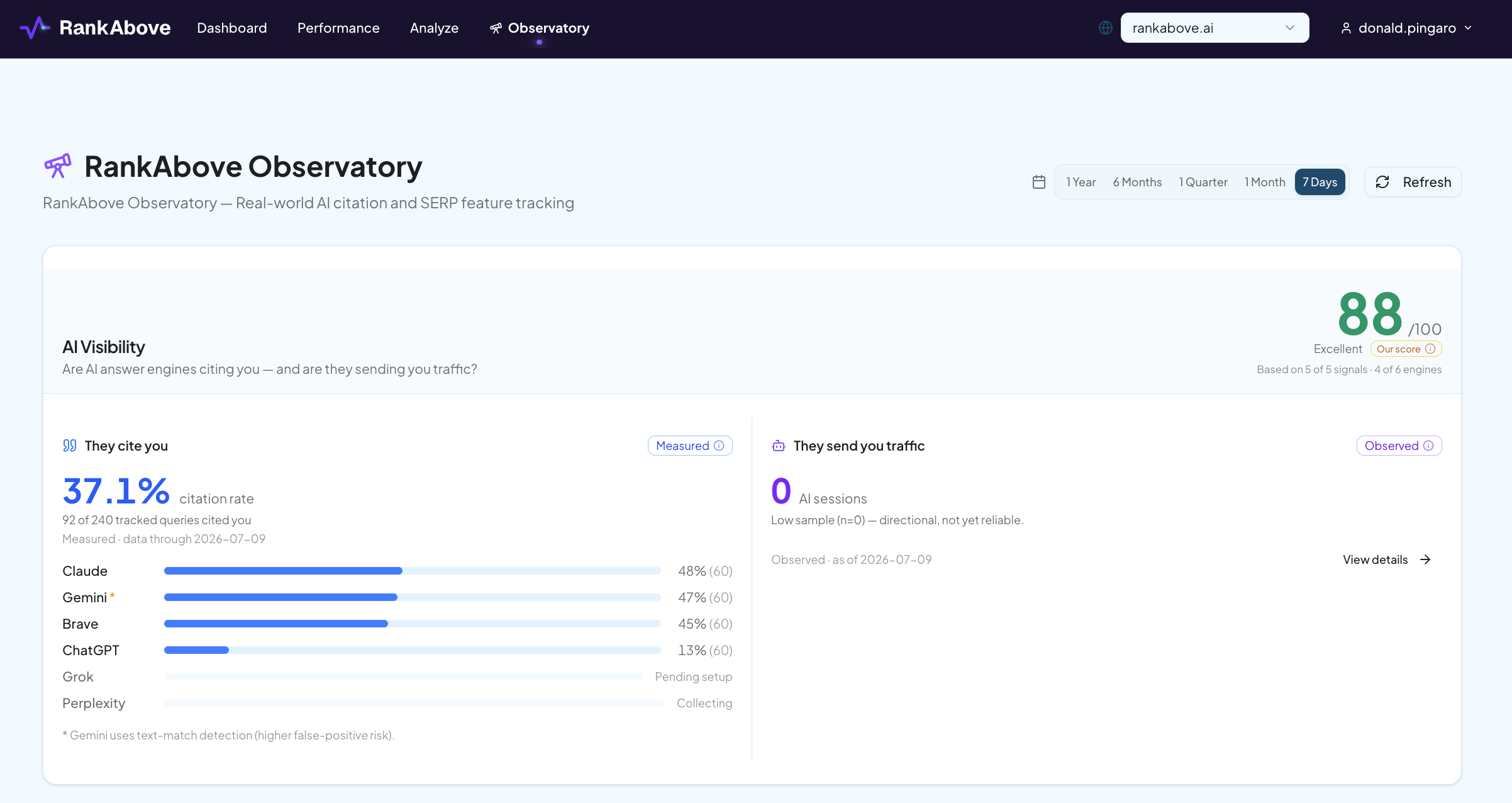
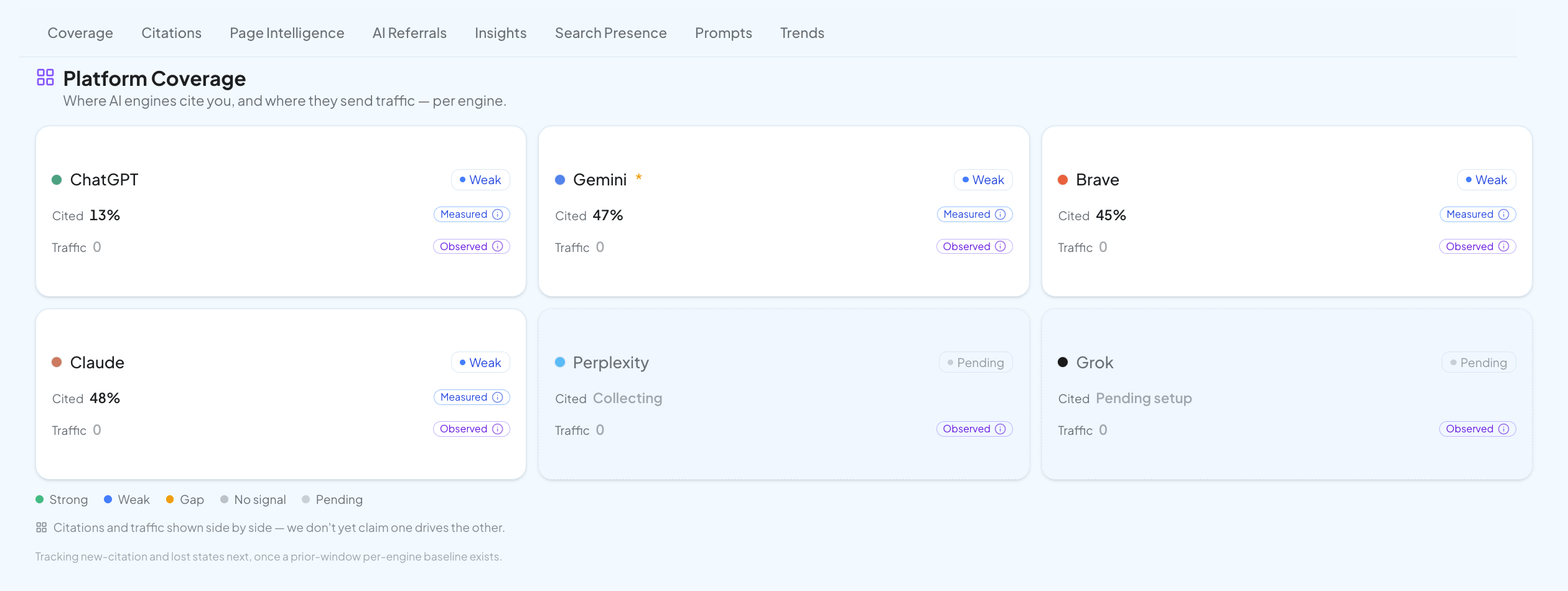
The Coverage tab shows one card per AI engine, each labeled Strong, Weak, Gap, No signal, or Pending based on how often it cites you, with your Cited rate (Measured) and the Traffic that engine sends you (Observed) shown side by side.

Citations and traffic are deliberately shown side by side rather than blended into one number: RankAbove does not yet claim that a citation on a given engine caused a given visit. That distinction is the same measured-versus-conclusion discipline covered in How RankAbove sources citation data.

Page Intelligence: everything about one page

Page Intelligence is one row per page, joining traffic, AI citations, SERP features, and your AEO, GEO, and SEO scores into a single view, with a Signal badge: Star (cited and getting traffic, keep doing what it's doing), Fix CTR (getting traffic but not cited, an opportunity), Improve (weak scores), or Build (too new or unscored to judge yet).

The Cross-validation column spells out the relationship in plain language, "Cited + traffic" or "Traffic, not cited, opportunity," so you can spot the exact pages where citations and visits are not yet reinforcing each other.

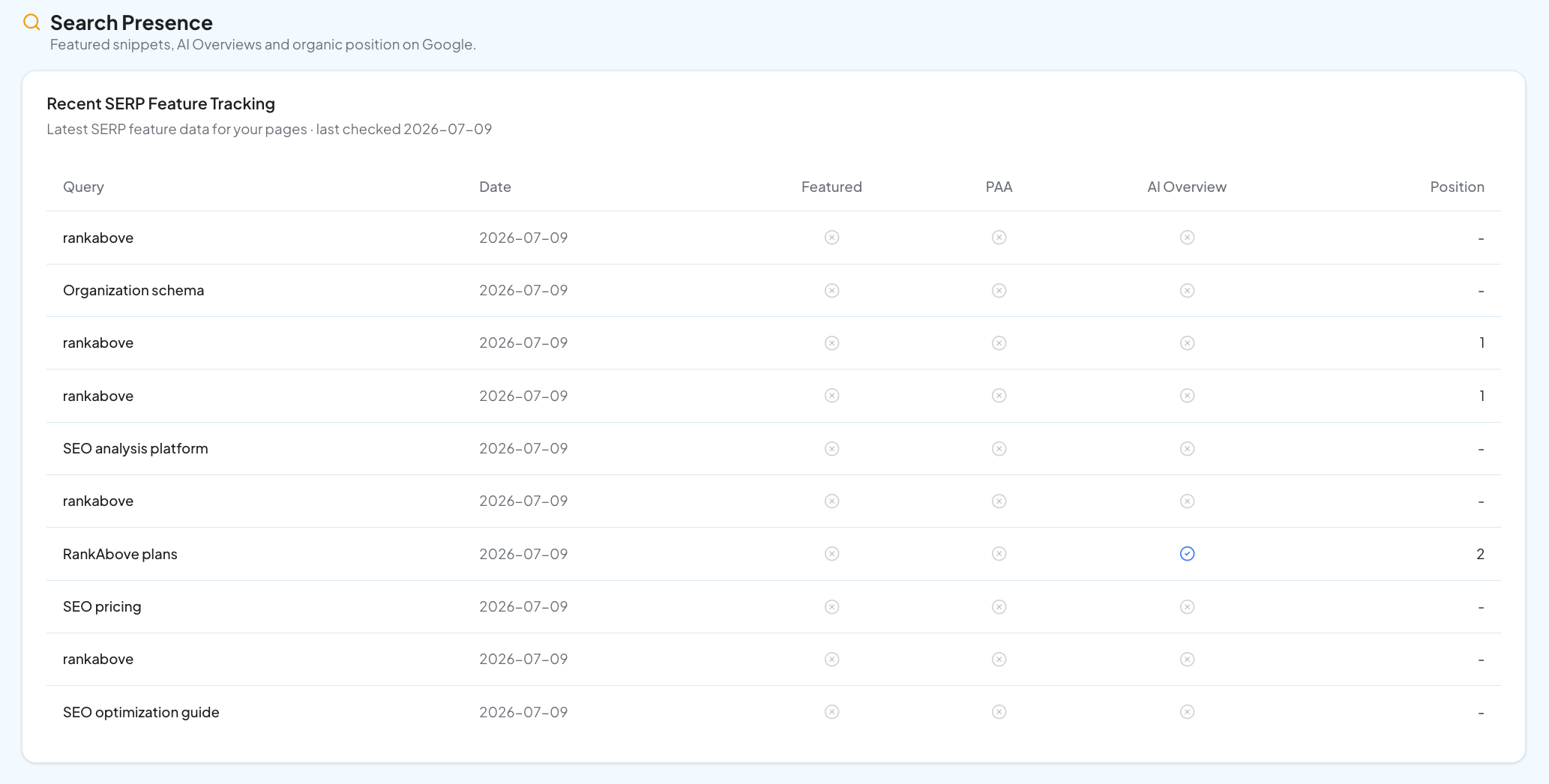
Search Presence: snippets, PAA, and AI Overviews

Search Presence tracks Google-specific SERP features separately from AI-engine citations: whether a query triggers a Featured Snippet, a People Also Ask box, an AI Overview, and your organic Position when one appears.

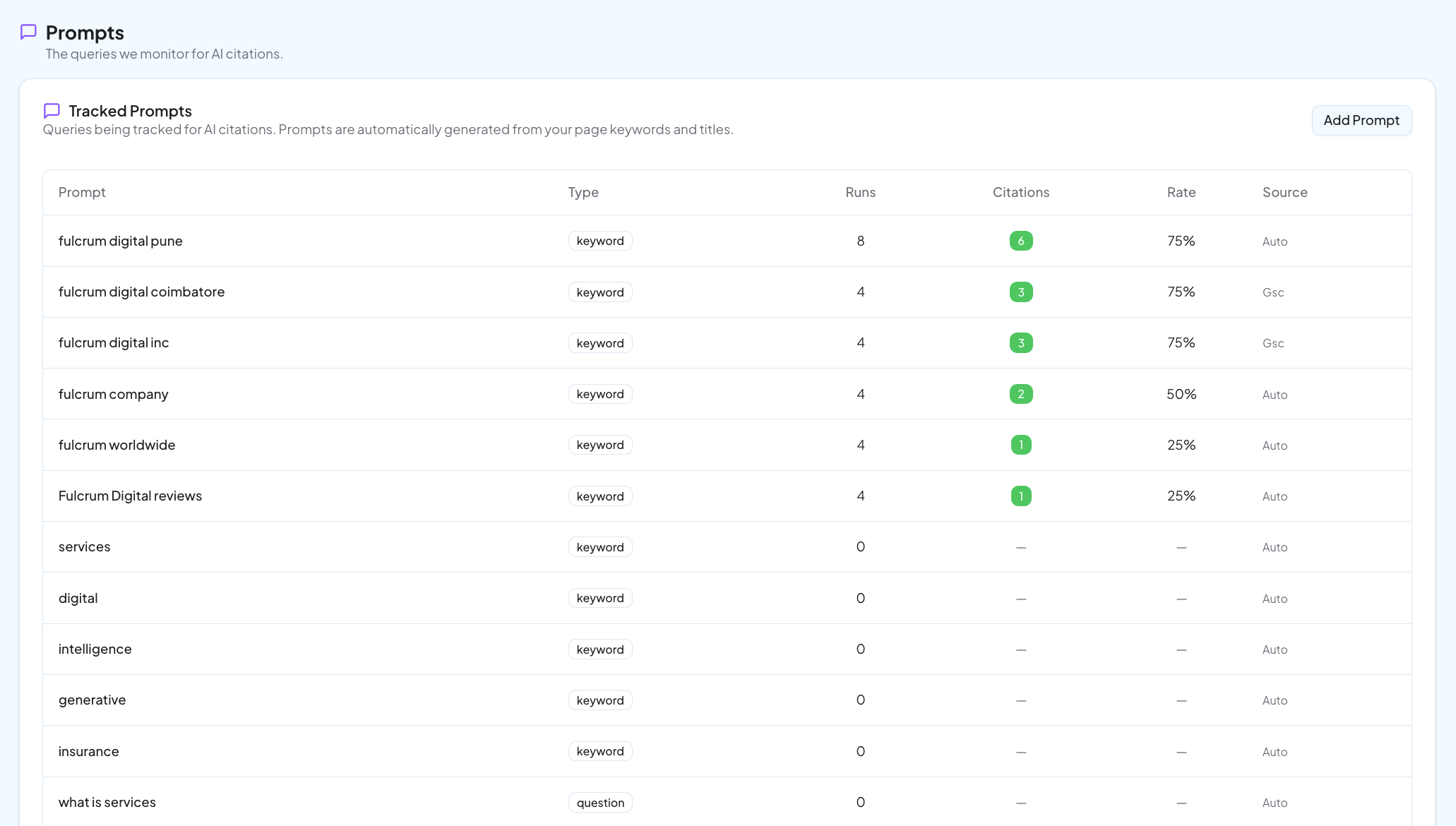
Prompts: what you are being tracked for

Prompts lists the Tracked Prompts RankAbove checks for AI citations. Most are generated automatically from your page keywords and titles; select "Add Prompt" to track a specific question your customers actually ask. Each row shows how many times the prompt has run, how many of those runs cited you, the resulting rate, and its source (auto-generated or pulled from Search Console).

RankAbove pings the relevant SERPs, APIs, and LLMs on your behalf and tells you whether you actually show up for the prompts you care about. Where you do not, the citation-factor recommendations elsewhere in RankAbove point at what to fix.

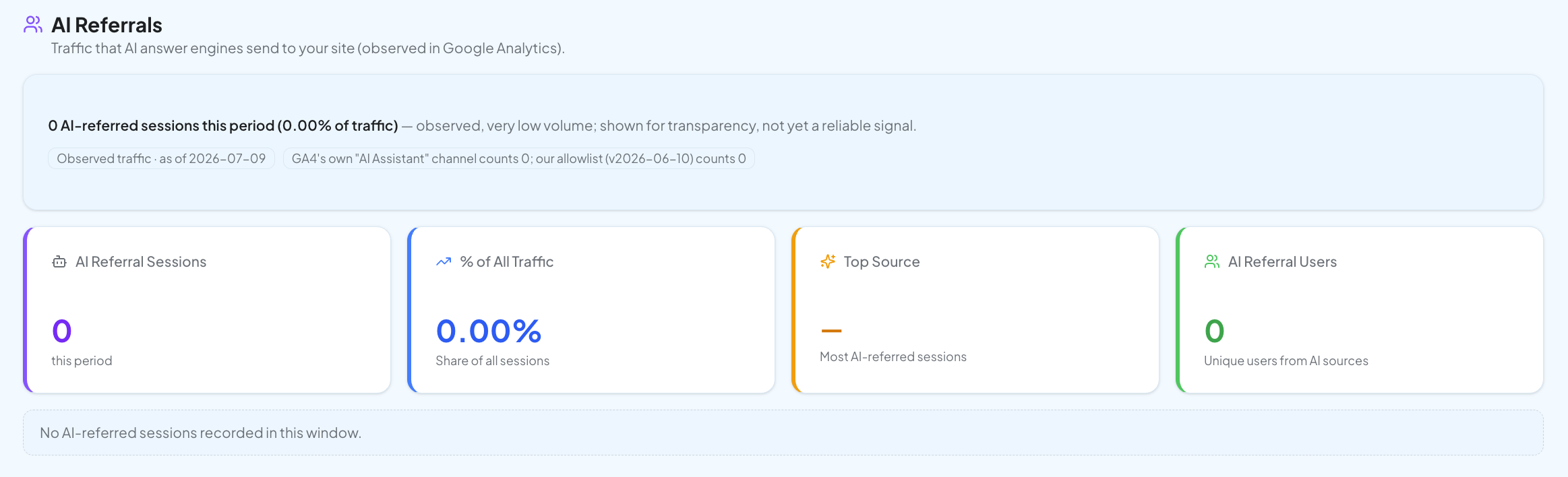
AI Referrals: traffic AI engines actually send

AI Referrals measures visits that AI answer engines send to your site, observed directly in Google Analytics. It requires Google Analytics 4 connected; without it, the tab prompts you to connect GA4 instead of showing data.

Volume here is typically very low today, and RankAbove shows it plainly rather than dressing it up: a result like "0 sessions, 0.00% of traffic" is labeled as observed but not yet a reliable signal, not hidden or rounded up.

Insights: the Content Opportunity Matrix

Insights ranks your pages by an opportunity heuristic built from traffic and engagement, surfacing where attention is most likely to pay off. Like AI Referrals, it depends on GA4 being connected.

Treat the ranking as a prompt to investigate, not a validated outcome. A high-opportunity page is worth a look this cycle; it is not a guarantee of what optimizing it will return.

Trends: performance over time

Trends charts Citation Rate Over Time and SERP Feature Performance (featured snippets and AI Overview citations) across the date range you select. This is the view for judging a monthly cycle honestly, and the one worth screenshotting for reporting.

Action Priority List and Executive Insights

Below the main tabs, RankAbove surfaces an Action Priority List, pages to look at first, ranked by reach times headroom (high traffic, high bounce), alongside Executive Insights, plain-English, descriptive observations about your traffic this period.

Both are intentionally worded as prompts to investigate rather than promises: RankAbove labels these observations as descriptive, not causal, the same discipline behind every statistic in How RankAbove sources citation data.

A monthly loop

A practical rhythm: after each 30-day cycle, check Trends for the pages you changed, scan Insights and the Action Priority List for next month's candidates, and review Page Intelligence for pages that moved from "Fix CTR" to "Star." Ten minutes here sets up the next cycle's priorities.

What counts as a citation?

A citation is any time an AI tool, ChatGPT, Claude, Gemini, Perplexity, or an AI Overview in Google, references your site as a source in a generated answer. Citations are the GEO equivalent of a first-page ranking: they put your brand inside the answer itself.

Reading the citation dashboard

Open "Observatory" in the main menu. The AI Visibility view shows your overall citation rate, a per-engine breakdown, and the pages earning the most citations. Use the time range selector to compare periods, a rising citation rate after a round of optimizations is the clearest signal your GEO work is paying off.

Tracking specific prompts

Select "Add a Prompt" to track a question your customers actually ask, for example, "what is the best platform for AI search visibility?" Fill in the prompt details, select "Add Prompt", and RankAbove will check regularly whether your site is cited in the answers each engine generates.

Tip

Track 5–10 prompts that map to your highest-value pages. Prompts phrased the way real buyers speak give far more useful signals than keyword-style fragments.

Acting on what you find

When a competitor is cited for a prompt and you aren't, analyze the relevant page from the "Analyze" menu. RankAbove's recommendations will include specific strategies drawn from the pages that are winning that citation, and its recursive learning layer sharpens those recommendations as you analyze more pages.

Check the "Performance" page after each 30-day cycle to see the downstream effect on clicks and impressions.

Supported platforms

RankAbove integrates natively with WordPress, Shopify, Drupal, Adobe Experience Manager, Adobe Commerce, and Magento. Approved content corrections push directly to your CMS with no developer access, no agency handoff, and no sprint queue.

Connecting your CMS

Open "Settings" from the menu under your name, choose the "Integrations" tab, and select your CMS under the integrations list. Sign in with an account that has publishing rights and follow the prompts. A success message confirms the connection.

Publishing an approved change

Once a recommendation clears your approval workflow, select "Deploy" and RankAbove publishes it to the connected CMS. A full snapshot of the page is captured first, so every deployment can be rolled back instantly.

Why it matters

Traditional content fixes take 6 to 10 weeks once identified, briefed, written, ticketed, and queued. RankAbove compresses that loop to the same business day, before the AI visibility window closes.

No engineering required

The entire loop, detection, diagnosis, approval routing, and deployment, is built for marketing teams to operate independently. Engineering involvement is never required, though your governance workflow can include technical reviewers whenever you want it to.

Human-in-the-loop by design

No content recommendation, correction, or technical optimization is published without explicit approval from a human reviewer. This is not a setting that can be bypassed; it is a structural design choice built for the compliance, legal, and brand safety requirements of enterprise teams.

Configuring approval routing

Approval workflows are configurable. Route any suggested change to a content administrator, legal reviewer, compliance officer, or executive, in whatever order your organization requires. Reviewers can approve, edit, or skip each change individually.

The audit trail

Every decision is recorded: what was recommended, who reviewed it, what they changed, and when it deployed. The full trail supports enterprise governance, regulatory compliance, and internal accountability.

Rolling back a change

A snapshot of each page is captured before any change is deployed. If a published change needs to be reversed, use one-click rollback to restore the prior page state at any time, with full version history.

Good to know

Rollback restores the page content, not your analysis history. Scores and citation data from the interim period are preserved so you can still measure what happened.

Why 30 days

Search engines need time to recrawl, reindex, and resettle rankings after a change. If you make too many changes inside a 30-day window, Google may penalize the churn, and you lose the ability to tell which change did what. One cycle per month keeps your work safe and your results readable.

The four steps

1. Analyze. Run the page through the Analyze workflow and review its scores and recommendations.

2. Optimize. Generate optimized content, apply your page rules, and route everything through your approval workflow.

3. Deploy. Publish approved changes in one batch, directly to your CMS or via copy and paste.

4. Measure. After 30 days, check the Performance page and the Observatory, then start the next cycle.

Tip

Stagger your pages. Running ten pages on the same monthly date creates a review bottleneck; spreading them across the month keeps the approval queue short.

Staying scientific

Batching changes once per month turns each page into a clean experiment: one set of changes, one waiting period, one measured result. That is what makes the projected point improvements in your recommendations verifiable rather than hopeful.

When not to wait

Brand misrepresentation is the exception. If RankAbove detects an AI engine describing your brand inaccurately, deploy the correction immediately; accuracy fixes do not carry the same churn risk as content rewrites, and the affected query is re-checked within 24 hours.

What structural improvements are

Structural improvements are fixes to how your page is built rather than what it says: schema markup, heading structure, and machine-readable signals that let search and AI engines parse your entities, products, and facts. Pages with complete structured data are dramatically more likely to be cited.

How RankAbove diagnoses schema

If RankAbove detects a missing or incorrect schema, the report names the schema type, and diagnoses the impact it is having on the page: which pillar scores it suppresses and what visibility it costs you.

Generating the fix

Tap "Generate" and RankAbove creates the markup for you in seconds. Review the generated code, approve it through your workflow, and implement it, directly via your CMS integration or by handing it to whoever manages the page.

Example

A product page missing Product schema gets a generated JSON-LD block with name, description, price, and availability filled in from the page content, ready to review and paste.

Verifying the change worked

Re-run the page through Analyze after deploying. The structural item should clear from the list, and you should see movement in the Structured Data pillar on your next snapshot.