When RankAbove optimizes page content, it applies best practices in SEO, GEO, and AEO. Page rules add your requirements on top: write for a technical audience, keep sentences under 20 words, never mention a competitor by name, or write the content in French.
Adding a rule
At the top of the side-by-side comparison on the Analyze page, you will find the instruction box. Type your rule in plain language and click "Re-Process Content". Every recommendation for the page is regenerated with your rule applied.
Example
A rule like "Write for hospital procurement teams, formal tone, no marketing superlatives" reshapes every optimized passage on the page while keeping the underlying SEO, GEO, and AEO improvements intact.
What makes a good rule
Specific, testable instructions work best. "Professional tone" is vague; "avoid exclamation marks, use second person, keep paragraphs under three sentences" is enforceable. You can stack multiple rules in one instruction.
When to use rules vs. editing
Use rules for anything that should apply to the whole page, voice, audience, language, or compliance constraints. For one-off wording preferences, it is faster to edit the generated content directly before you copy it to your site or route it for approval.
Opening the editor
From a completed analysis, tap the purple "Optimize Page Content" button. Generation may take up to a minute for larger pages, but typically finishes in a few seconds. The optimizer opens as a full working panel over the report, with "Copy All," .md, and .csv export options at the top for teams that work outside RankAbove.
Custom Instructions: your master prompt
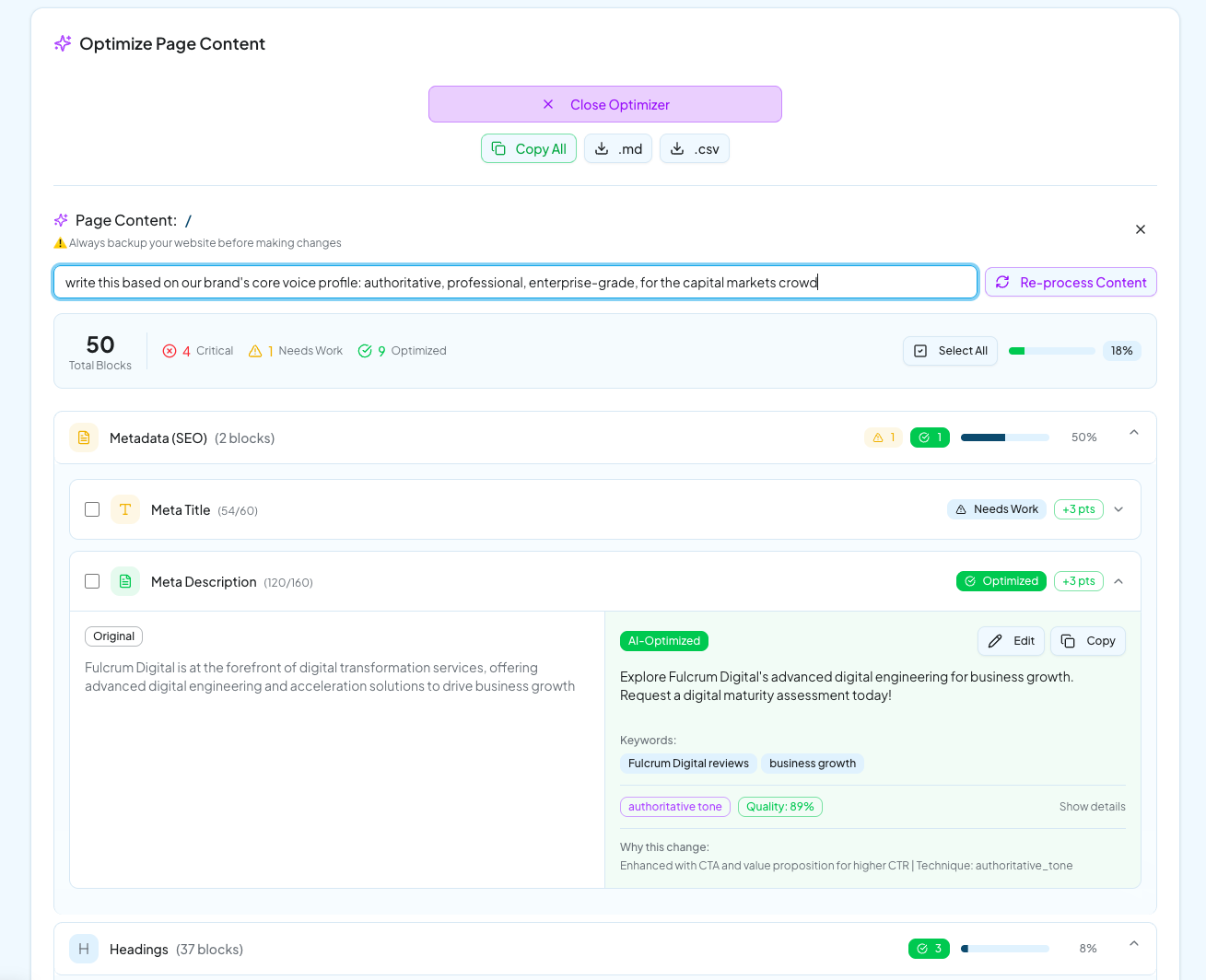
At the very top of the optimizer sits an open field labeled “Optional Custom Instructions.” Treat it as a master prompt: describe your brand voice, target audience, a specific language, or a compliance rule once, then click “Re-process Content” to apply it across every recommendation on the page at the same time.
A single instruction like "write this based on our brand's core voice profile: authoritative, professional, enterprise-grade, for the capital markets crowd" reshapes every block on the page in one pass. This is dramatically faster than editing each recommendation by hand, and it works the same way as the page-wide rules described in Using the Page Rule Content Agent.
Reading the block summary
Just below Custom Instructions, a summary bar shows the Total Blocks RankAbove evaluated on the page, split into Critical, Needs Work, and Optimized, alongside a Select All checkbox and an overall completion percentage. Use it as a bird's-eye view of how much of the page still needs attention, and work down from Critical first.
Where the categories map
Critical, Needs Work, and Optimized mirror the same severity language used on the Dashboard’s score bands, so a page that reads Critical here is usually the same page sitting in your Underperforming Pages list.
Reading a recommendation block
Recommendations are grouped by element, starting with Metadata (SEO): Meta Title and Meta Description each get their own block, with your Original text on the left and AI-Optimized text on the right. Every block carries a point badge showing how many points the change is projected to add to a specific score, SEO for rankings, GEO for citations, AEO for direct answers, plus a Quality percentage and the keyword tags it targets. Expand "Show details" to see exactly why the change was made, down to the technique applied.
The same pattern continues through Headings and every other text element RankAbove found on the page, block by block.
Editing before you ship
Any user can review and edit the AI-optimized side of a block directly with its Edit button, and Copy a single block on its own. Editing lets you further control brand voice, add or remove specific messaging, and tailor a recommendation before it goes to review or gets applied to your site.
Custom Instructions vs. editing a block
Reach for Custom Instructions when a change should apply everywhere on the page, voice, audience, language, or a compliance rule. Edit a block directly for a one-off tweak that only that block needs.
Image optimization: alt text
Below the text recommendations sits a section for image optimization, focused on Alt Text. This one factor matters twice: it is a critical accessibility signal (see Accessibility and search visibility) and, separately, a direct SEO factor, since search engines cannot see an image; they read its description.
Structural Improvements
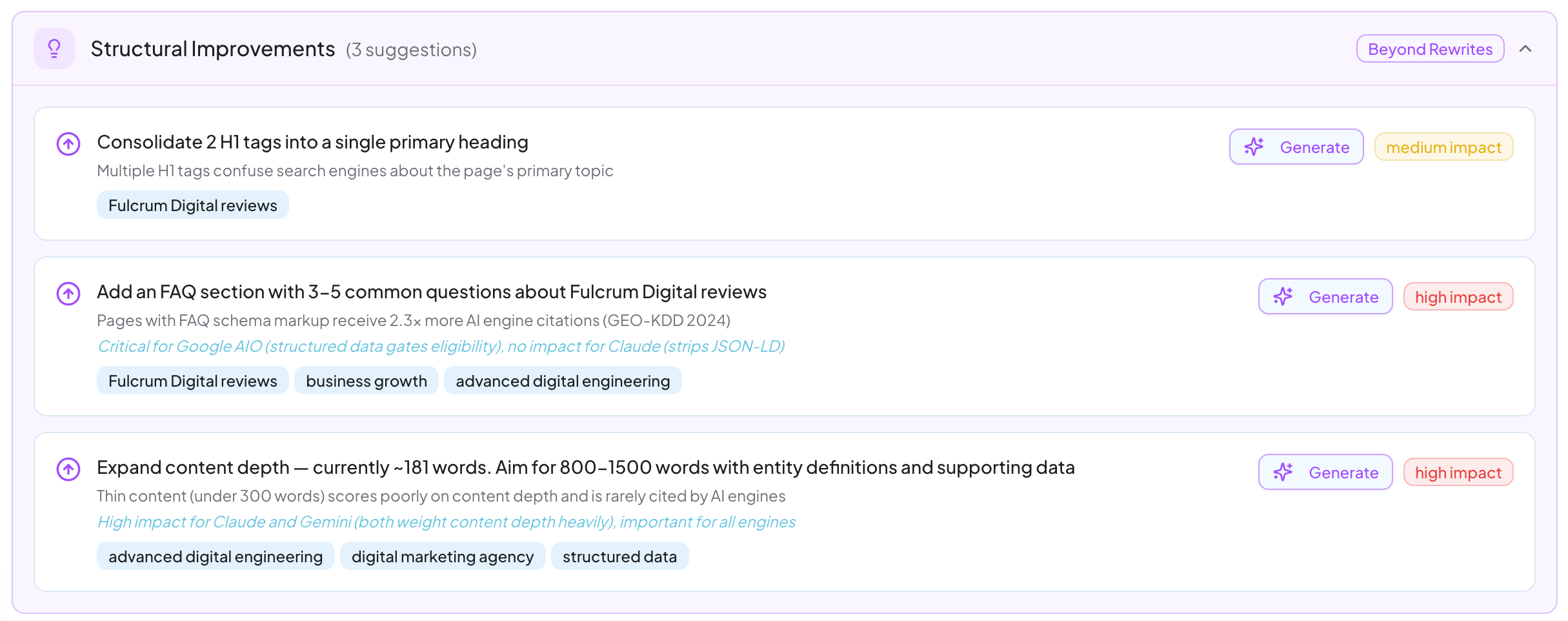
Beneath image recommendations is "Structural Improvements," changes that go beyond rewriting existing text: consolidating multiple H1 tags into one, or adding an FAQ section with schema markup. Each suggestion shows its expected impact and, where it matters, which AI engines care most, some structural fixes are critical for Google AI Overviews and irrelevant to an engine that strips structured data entirely. Tap "Generate" and RankAbove builds it for you.
Full detail on generating and verifying these fixes lives in Generating structural improvements and schema.
Optimization Suggestions
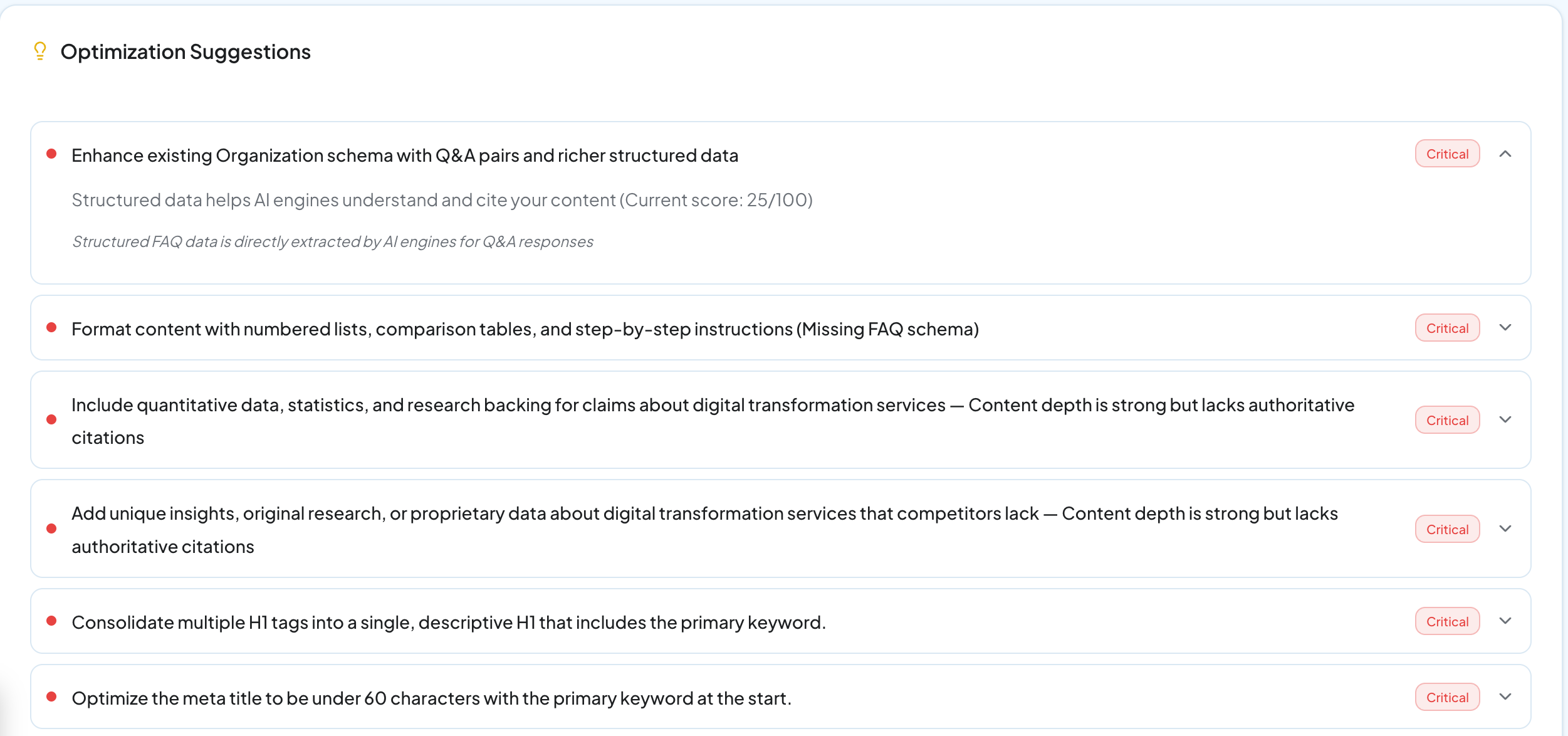
At the very bottom of the optimizer is "Optimization Suggestions," broader rules for improving performance across every score rather than a single block: enhancing existing schema with Q&A pairs, formatting content with numbered lists and comparison tables, adding quantitative data and citations, expanding thin content. Each is tagged by severity and expands for more detail.
This list is the same idea as the "What We'll Optimize" slider on the Analyze report, but scoped to page-wide structural and content-depth rules rather than individual text.
Shipping the result
Select the blocks you want, or use "Select All," then "Copy All" or export as .md or .csv if your workflow is copy-and-paste. If your CMS is connected, route the batch through your approval workflow and deploy directly. "Close Optimizer" returns you to the full analysis report at any time.
Best practice
Ship the batch, then let the 30-day window run before judging the result. See The 30-day optimization cycle.
What the slider shows
After an analysis completes, scroll down to the slider titled "What We'll Optimize". It is an at-a-glance list of immediate action items for improving the page's performance, plus a short list of what is working well, worth reading first, so you do not accidentally optimize away your strengths.
How items are prioritized
Items are ordered by expected impact. Each carries a projected point improvement range against the score it affects, so a fix projected at +8 to +12 GEO points outranks one projected at +2 to +4. Critical items, the ones actively costing you visibility, surface at the top.
Deciding what ships
Work down from the top until you reach your capacity for this month's cycle. A good monthly batch is 3 to 5 changes: enough to move scores measurably, small enough to review properly and to stay under the churn threshold that risks a Google penalty.
Best practice
Ship the top items and note the rest. Next month’s analysis will re-rank everything based on what your changes actually earned.
Start with the Dashboard page lists
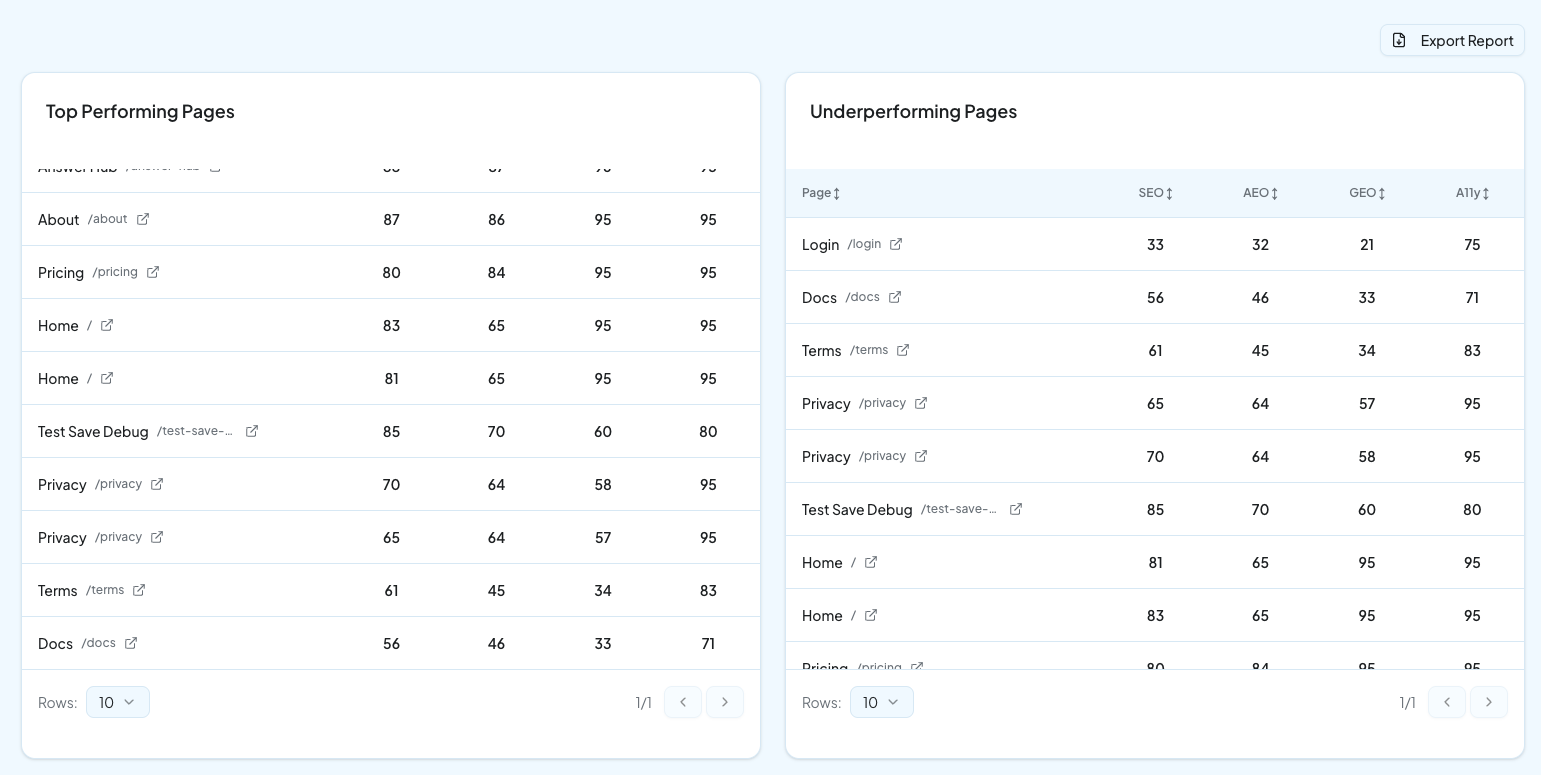
You do not have to guess where the problems are. At the bottom of the Dashboard page there is a dedicated section listing your Top Performing Pages and Underperforming Pages, with each page's SEO, AEO, GEO, and accessibility scores side by side.
Review this section first, and start with your worst performing pages: the Underperforming Pages list is already sorted so the pages costing you the most visibility surface at the top. Sort by any score column to find where a specific layer breaks down.
The three questions
For every candidate page, ask: How much is at stake? (traffic and commercial value), How weak is it? (the lowest of its four scores), and How winnable is the gap? (is a competitor already cited where you are not?). The best first pages score high on all three.
Where to start
Then break these down by focusing on commercial pages that already get impressions but underperform on clicks or citations: product pages, service pages, and comparison pages. They have proven demand, so every point of score improvement converts to visible results faster than on a page nobody searches for.
Rule of thumb
Proven demand plus a weak layer equals your first optimization target. A page with impressions but a low GEO score is usually the fastest win in the account.
Use citation gaps as a shortlist
The Observatory shows queries where AI engines answer but never cite you. Match each gap to the page that should be winning it, and you have a ready-made priority list, ordered by the value of the queries involved.
Pace yourself
Pick 3 to 5 pages per month and run them through the full cycle: analyze, optimize, deploy, and measure. Stagger start dates so reviews do not pile up. Resist the urge to touch a page mid-cycle; let the 30-day window finish so the result is readable.
Choosing a page
Click "Analyze" in the main menu. Select a page from the dropdown list, or start typing to filter. For your first run, pick a page that matters commercially but is not your homepage; a product, service, or key content page gives the clearest before-and-after.
Running the analysis
Click "Analyze" to begin. RankAbove crawls the page, pulls your connected Google Search Console and Google Analytics data, and evaluates the page for gaps across ranking factors, citation factors, and direct answer factors. Larger pages take up to a minute.
Reading the report
The report opens with your four scores: SEO, GEO, AEO, and accessibility. Scroll to "What We'll Optimize" for the at-a-glance list of immediate action items, alongside a short list of what is already working well.
Tip
Do not try to fix everything at once. The recommendations are ranked; the top items carry the largest projected point improvements.
What to do next
From here, tap "Optimize Page Content" to generate the side-by-side content recommendations, or scroll further for structural improvements and optimization suggestions. You can return to this report anytime by selecting the same page in the Analyze dropdown.
A peer-reviewed baseline, treated as a hypothesis
We started with a peer-reviewed baseline: the Generative Engine Optimization research published at ACM KDD 2024. That gave us a scientifically grounded framework for what should drive AI citations. But we treat that paper as a hypothesis, not gospel. Some of its headline recommendations haven't held up when retested in 2026, and that's exactly the point. Our system, DataLab, exists to test the framework against our own measured citation data and re-anchor it wherever the evidence disagrees. Pre-registered hypotheses, real significance thresholds, corrections for multiple comparisons. It's the scientific method applied to search optimization, and the product gets more accurate the more it's used, because every analysis feeds the research pipeline.
Where the data comes from
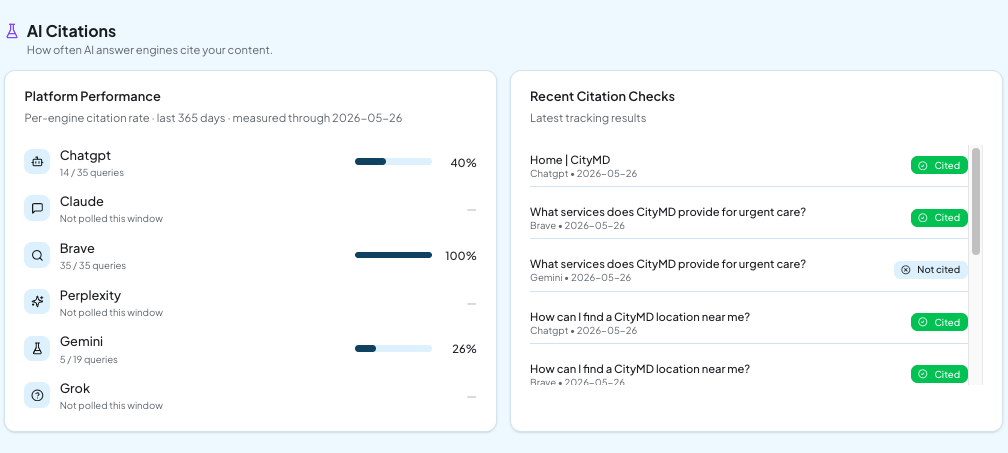
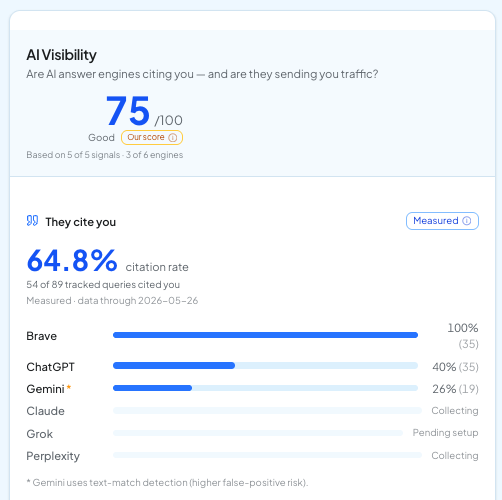
Here's the data that powers it. When a page is analyzed, that page is put into the tracking pool. For each page you track, RankAbove assembles real search queries, anchored in the actual Google searches your page already receives. Daily, we run those queries against the major AI engines through their official APIs with live web search enabled, and read the structured list of sources each engine says it used. We match your domain exactly against that list. When an engine merely mentions you in its answer text without sourcing you, we record that separately and never count it the same as a real citation.
What you see
The result is a per-page, per-engine citation rate you can watch over time: edit your content, see whether the engines start citing you.
Our statistical bar
Our validation system is built with pre-registered hypotheses and significance thresholds. We show you measured data as measured. Your real, observed citation rates. What we withhold is conclusions: we never present a technique or recommendation as proven to work until it clears that bar. Until then it's treated as unproven, internally and externally. No one should change their content strategy on a whisper.
What RankAbove reads
With GA4 connected, RankAbove pulls the historical insights you have already gathered: traffic, engagement, and attribution context for each page. Your data stays in your Google account; RankAbove reads it during analysis rather than copying it out.
How it improves recommendations
Analytics context makes recommendations more specific: RankAbove can weight fixes by the traffic actually at stake, improve attribution accuracy when measuring what a change earned, and maintain better data hygiene across cycles. A fix on a page with real traffic behind it gets prioritized accordingly.
Analytics beside your pages
GA4 data also appears alongside the pages you work on inside RankAbove, so your team reviews traffic context without switching tabs during an optimization cycle.
Connecting GA4
Open "Settings" from the menu under your name, choose "Integrations", and below your Search Console properties find "Google Analytics 4". Click "Connect Your Account", sign in, and follow the prompts. A success message confirms the integration.
Good to know
GSC is required; GA4 is recommended. If you skip GA4, analyses still run, they just lose the traffic-weighted context.
The browser warning screen
During the Google sign-in flow you may see a warning message. RankAbove is still in beta, so this is expected: click "Advanced" in the bottom left and proceed with the connection. A message confirms when the connection is complete.
Permission problems
The Google account you connect must have access to the site's property in Search Console, Full or Owner access works best. If the connection succeeds but no data appears, check that you signed in with the account that actually holds the property, not a personal account.
Property type mismatches
Search Console properties come in two types: domain properties (example.com, all protocols and subdomains) and URL-prefix properties (https://www.example.com only). Make sure the site you added in RankAbove matches a property that exists in your Search Console, including the www and https details.
Checklist
Site added in Settings → Sites tab. Google account has Owner or Full access. Property type matches your URL exactly. Beta warning passed via "Advanced".
Still stuck?
Disconnect and reconnect from the Integrations tab, which restarts the authorization cleanly. If the connection still fails, tap the "Feedback" button in the bottom right corner and include your domain and the step where it fails; the team responds quickly during beta.
Three layers, one platform
Traditional rankings (SEO), AI citations (GEO), and direct answers (AEO) each require a different optimization strategy, but they draw on the same pages. RankAbove scores all three side by side so you can see the full picture of a page's findability at a glance.
Projected point improvements
Every recommendation includes a projected point improvement range: how much the fix is expected to move the relevant score. This turns a long fix list into a ranked plan, so your team always works on the highest-leverage change first.
Prioritizing across layers
Because the scores sit together, trade-offs become visible. A page with strong SEO but weak GEO needs citation-oriented work, not more keywords. Sort your pages by the weakest layer to find where visibility breaks down first.
Context
With an AI Overview present, position 1 click-through rates drop sharply. Ranking well on Google alone no longer guarantees visibility, which is why the layers must be read together.
Enterprise reporting
Unified scoring supports reporting across traditional and generative search in one export, replacing fragmented dashboards from separate SEO, content, and analytics tools.
Overview
Your account, site, and analysis data live in managed cloud databases, not on servers RankAbove runs itself, and all traffic between your browser and RankAbove is encrypted in transit. For the legal details, read our Privacy Policy.
Where your data lives
Your account details, connected sites, and page-analysis settings are stored in a managed relational database. Your search visibility results, citation history, and the scores behind SEO, GEO, AEO, and accessibility live in a separate managed data platform, which also handles sign-in and file storage.
RankAbove doesn't run its own servers or storage hardware. Both platforms run on established cloud infrastructure providers.
How your data moves through the product
The application you sign into and the system that runs an analysis are separate services. A request is authenticated and routed first, then handed off to the system that performs the analysis itself.
Encryption in transit
Traffic between your browser and RankAbove is encrypted in transit over HTTPS.
Third-party AI and search providers
To measure your search and AI visibility, RankAbove queries third-party AI platforms and search engines, including ChatGPT, Claude, Gemini, Perplexity, Grok, and Google. Analyzing a page sends that page's public content, and any prompts you choose to track, to those providers.
The full privacy policy
Read the full Privacy Policy for the legal details: what RankAbove collects, how it's used, how long it's kept, and the rights you have over it.